> ## Documentation Index
> Fetch the complete documentation index at: https://docs.hifi.com/llms.txt
> Use this file to discover all available pages before exploring further.
# Terms of Service
> Users must accept HIFI's terms before you can create their account. You have two options for collecting this consent:
1. **Reference HIFI's Terms in Your Privacy Policy** – Include HIFI's terms by reference in your own ToS/privacy policy and accept the terms of service via API. Best for integrating without interrupting your existing compliance flow.
2. **Use HIFI's Hosted ToS Link** - Generate a ToS link and have users accept via HIFI-hosted pages.
Choose the approach that best fits your application architecture and user experience.
## Option 1: Reference Terms
If you already have a terms of service or privacy policy acceptance flow, you can reference HIFI's terms within it. This approach lets you keep users in your own onboarding flow while still generating the required signed agreement ID in the background.
### How It Works
1. Include HIFI's terms by reference in your privacy policy or terms of service
2. Collect acceptance through your existing flow (checkbox, button, etc.)
3. When the user accepts, generate and accept the ToS Link in the background
4. Create the user account, passing the accepted ToS Link ID as `signedAgreementId`
### Implementation
Add a reference to HIFI's terms in your privacy policy:
> We use HIFI to process financial transactions. By using our service, you also agree to HIFI's [Terms & Conditions](https://www.hifi.com/terms-conditions) and [Privacy Policy](https://www.hifi.com/privacy-policy).
After updating your Terms of Service, please contact us with documentation or evidence of the update. Our team will conduct periodic reviews to ensure continued compliance.
When the user accepts your privacy policy (which includes HIFI's terms by reference), generate a HIFI ToS Link in the background
**Request:**
```shellscript theme={null}
curl -X POST "https://sandbox.hifi.com/v3/tos-link" \
-H "Authorization: Bearer YOUR_API_KEY" \
-H "Content-Type: application/json" \
-d '{
"idempotencyKey": "{{$guid}}"
}'
```
**Response:**
```json theme={null}
{
"id": "48867c6c-1748-49a9-8e64-ed48f6815213",
"url": "https://app.hifi.com/tos?sessionToken=05477964-f29c-444d-abd6-36380980567f&sandbox=true",
"signed": false,
"sessionToken": "05477964-f29c-444d-abd6-36380980567f",
"createdAt": "2026-07-12T21:17:13.096Z",
"expiredAt": "2026-07-17T21:17:12.329Z"
}
```
Accept the ToS Link with the `sessionToken`
**Request:**
```shellscript theme={null}
curl -X POST "https://sandbox.hifi.com/v3/tos-link" \
-H "Authorization: Bearer YOUR_API_KEY" \
-H "Content-Type: application/json" \
-d '{
"sessionToken": "05477964-f29c-444d-abd6-36380980567f"
}'
```
**Response:**
```json theme={null}
{
"id": "48867c6c-1748-49a9-8e64-ed48f6815213",
"url": null,
"signed": true,
"sessionToken": "05477964-f29c-444d-abd6-36380980567f",
"createdAt": "2026-07-12T21:17:13.096Z",
"expiredAt": "2026-07-17T21:17:12.329Z"
}
```
Create User with the accepted ToS Link ID
**Request:**
```shellscript theme={null}
curl -X POST "https://sandbox.hifi.com/v3/users" \
-H "Authorization: Bearer YOUR_API_KEY" \
-H "Content-Type: application/json" \
-d '{
"type": "INDIVIDUAL",
"signedAgreementId": "48867c6c-1748-49a9-8e64-ed48f6815213",
"requestId": "705f1f8b-a080-467c-b683-174eca409928"
}'
```
**Response:**
```json theme={null}
{
"id": "usr_9RJb0KUrhugQ7uMZL5UML",
"type": "INDIVIDUAL",
"createdAt": "2026-07-12T21:19:32.760Z",
"updatedAt": "2026-07-12T21:19:32.760Z"
}
```
## Option 2: **Use HIFI's Hosted ToS Link**
Alternatively, you can collect user consent through HIFI-hosted pages. This approach provides explicit proof of consent and is useful when you want HIFI to handle the ToS presentation.
### **How It Works**
1. Create a unique ToS link and share it with your user.
2. The user reviews and accepts HIFI's terms and privacy policy via the hosted page.
3. When the user accepts, HIFI sends a webhook message indicating the ToS link has been accepted.
4. Create the user account, passing the ToS Link ID as `signedAgreementId`.
When the user accepts your privacy policy (which includes HIFI's terms by reference), generate a HIFI ToS Link in the background
**Request:**
```shellscript theme={null}
curl -X POST "https://sandbox.hifi.com/v3/tos-link" \
-H "Authorization: Bearer YOUR_API_KEY" \
-H "Content-Type: application/json" \
-d '{
"idempotencyKey": "{{$guid}}"
}'
```
**Response:**
```json theme={null}
{
"id": "48867c6c-1748-49a9-8e64-ed48f6815213",
"url": "https://app.hifi.com/tos?sessionToken=05477964-f29c-444d-abd6-36380980567f&sandbox=true",
"signed": false,
"sessionToken": "05477964-f29c-444d-abd6-36380980567f",
"createdAt": "2026-07-12T21:17:13.096Z",
"expiredAt": "2026-07-17T21:17:12.329Z"
}
```
Display the ToS page to your user (via link or embedded). User reviews and accepts HIFI's terms and privacy policy.
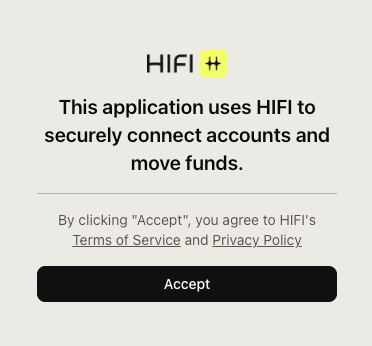 After the ToS Link is accepted, HIFI will send out webhook message to the registered URL.
**Response:**
```json theme={null}
{
"id": "48867c6c-1748-49a9-8e64-ed48f6815213",
"url": null,
"signed": true,
"sessionToken": "05477964-f29c-444d-abd6-36380980567f",
"createdAt": "2026-07-12T21:17:13.096Z",
"expiredAt": "2026-07-17T21:17:12.329Z"
}
```
Create User with the accepted ToS Link ID
**Request:**
```shellscript theme={null}
curl -X POST "https://sandbox.hifi.com/v3/users" \
-H "Authorization: Bearer YOUR_API_KEY" \
-H "Content-Type: application/json" \
-d '{
"type": "INDIVIDUAL",
"signedAgreementId": "48867c6c-1748-49a9-8e64-ed48f6815213",
"requestId": "705f1f8b-a080-467c-b683-174eca409928"
}'
```
**Response:**
```json theme={null}
{
"id": "usr_9RJb0KUrhugQ7uMZL5UML",
"type": "INDIVIDUAL",
"createdAt": "2026-07-12T21:19:32.760Z",
"updatedAt": "2026-07-12T21:19:32.760Z"
}
```
## Custom Templates & Redirect
White-label the ToS page with your branding and include a redirect URL for once the user accepts the terms of service:
1. **Upload Branding:** Upload your company logo via [https://app.hifi.com/sandbox/developer/template](https://app.hifi.com/sandbox/developer/template)
2. **Receive Template ID:** Once the logo is uploaded, you will receive the template ID on the same page
3. **Use Template ID:** Include `templateId` when generating ToS Link
4. **Include redirect URL**: Include `redirectUrl` when you want to send user to a different page once terms of service is accepted.
```bash theme={null}
curl -X POST "https://sandbox.hifi.com/v3/tos-link" \
-H "Authorization: Bearer YOUR_API_KEY" \
-H "Content-Type: application/json" \
-d '{
"idempotencyKey": "a4f8b3c2-1d5e-4a7b-9c8d-3e2f1a0b9c8d",
"redirectUrl": "https://yourapp.com/onboarding/complete",
"templateId": "35f754bc-ca86-4d32-a4b5-20b93671ab79"
}'
```
## Getting Help
* 📧 **Email:** [support@hifi.com](mailto:support@hifi.com)
* 💬 **Slack:** Message us in our shared Slack channel
## Related Resources
* [Users](/v3/core/users/overview) - Create user accounts after ToS acceptance
* [HIFI Terms & Conditions](https://www.hifi.com/terms-conditions) - View the terms users accept
* [HIFI Privacy Policy](https://www.hifi.com/privacy-policy) - View the privacy policy users accept
After the ToS Link is accepted, HIFI will send out webhook message to the registered URL.
**Response:**
```json theme={null}
{
"id": "48867c6c-1748-49a9-8e64-ed48f6815213",
"url": null,
"signed": true,
"sessionToken": "05477964-f29c-444d-abd6-36380980567f",
"createdAt": "2026-07-12T21:17:13.096Z",
"expiredAt": "2026-07-17T21:17:12.329Z"
}
```
Create User with the accepted ToS Link ID
**Request:**
```shellscript theme={null}
curl -X POST "https://sandbox.hifi.com/v3/users" \
-H "Authorization: Bearer YOUR_API_KEY" \
-H "Content-Type: application/json" \
-d '{
"type": "INDIVIDUAL",
"signedAgreementId": "48867c6c-1748-49a9-8e64-ed48f6815213",
"requestId": "705f1f8b-a080-467c-b683-174eca409928"
}'
```
**Response:**
```json theme={null}
{
"id": "usr_9RJb0KUrhugQ7uMZL5UML",
"type": "INDIVIDUAL",
"createdAt": "2026-07-12T21:19:32.760Z",
"updatedAt": "2026-07-12T21:19:32.760Z"
}
```
## Custom Templates & Redirect
White-label the ToS page with your branding and include a redirect URL for once the user accepts the terms of service:
1. **Upload Branding:** Upload your company logo via [https://app.hifi.com/sandbox/developer/template](https://app.hifi.com/sandbox/developer/template)
2. **Receive Template ID:** Once the logo is uploaded, you will receive the template ID on the same page
3. **Use Template ID:** Include `templateId` when generating ToS Link
4. **Include redirect URL**: Include `redirectUrl` when you want to send user to a different page once terms of service is accepted.
```bash theme={null}
curl -X POST "https://sandbox.hifi.com/v3/tos-link" \
-H "Authorization: Bearer YOUR_API_KEY" \
-H "Content-Type: application/json" \
-d '{
"idempotencyKey": "a4f8b3c2-1d5e-4a7b-9c8d-3e2f1a0b9c8d",
"redirectUrl": "https://yourapp.com/onboarding/complete",
"templateId": "35f754bc-ca86-4d32-a4b5-20b93671ab79"
}'
```
## Getting Help
* 📧 **Email:** [support@hifi.com](mailto:support@hifi.com)
* 💬 **Slack:** Message us in our shared Slack channel
## Related Resources
* [Users](/v3/core/users/overview) - Create user accounts after ToS acceptance
* [HIFI Terms & Conditions](https://www.hifi.com/terms-conditions) - View the terms users accept
* [HIFI Privacy Policy](https://www.hifi.com/privacy-policy) - View the privacy policy users accept